
Headless Patient Documents: A Technical Guide to How Box, Salesforce, and Slack Work Together in IHOS
A companion to the blog post The Patient File That Finds You. Part of the Intelligent Healthcare Operating System (IHOS) initiative.
Executive Summary
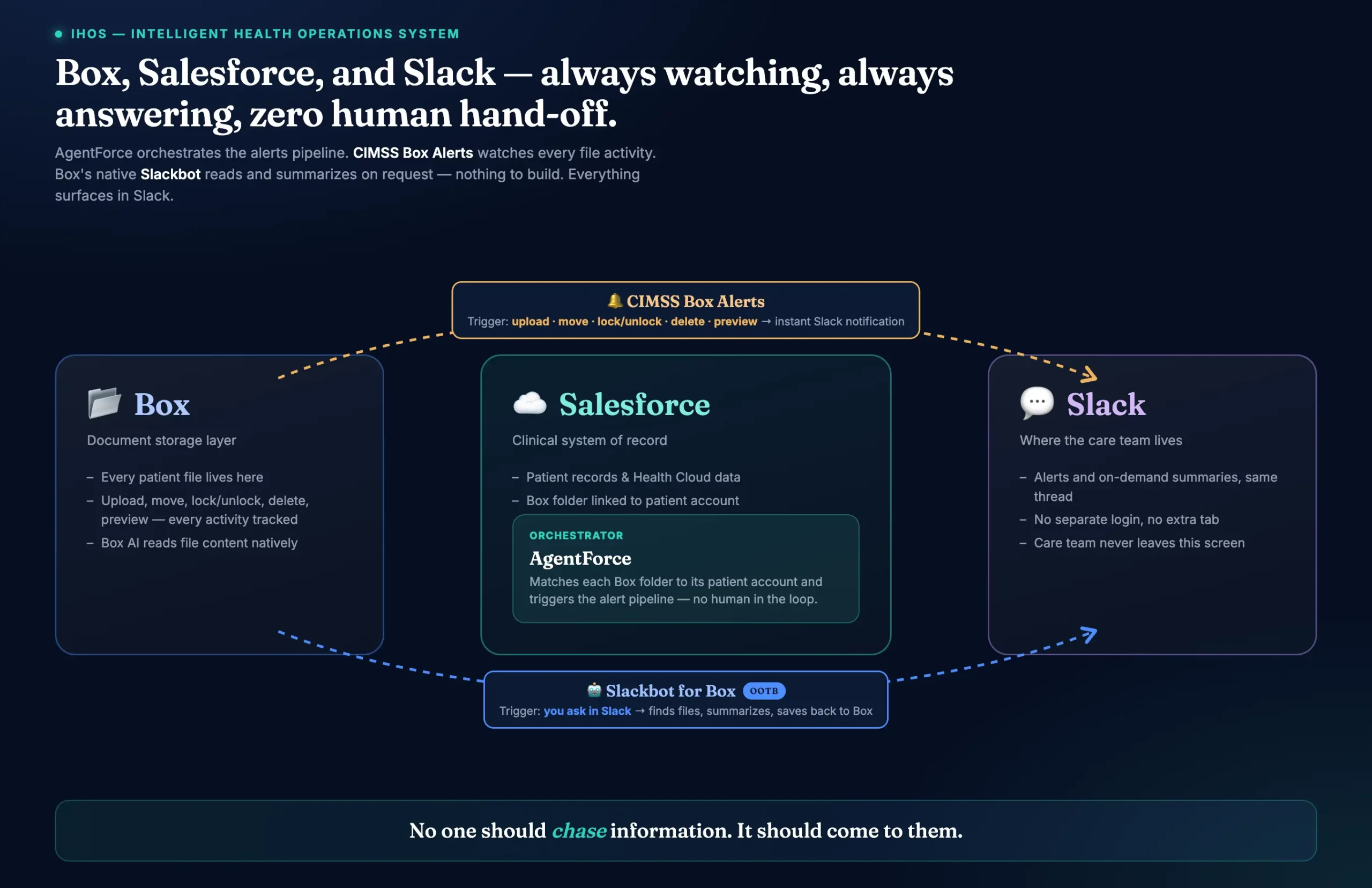
Care teams work in Slack. Patient documents live in Box. Clinical context lives in Salesforce. Historically, moving between the three meant context switching, manual searching, and files that arrived without anyone noticing.
IHOS closes that gap with two complementary capabilities, both delivered inside the patient’s Slack channel:
- Ask (on demand). Slackbot, connected to our Box account, finds a patient’s files, summarizes a document, and saves the summary back to Box when the user asks.
- Watch (event-driven). CIMSS Box Alerts, a Slack app built by CIMSS, posts a notification to the patient’s channel whenever a file in the patient’s Box folder is uploaded, renamed, moved, or trashed.
Neither capability replaces Box as the document store or Salesforce as the system of record. Box permissions remain the single source of truth for who can access a file.
The Problem
- Search friction. Finding one document means leaving Slack, opening Box, and traversing nested folders.
- Silent arrivals. A new lab report or consent form lands in a folder and nobody is told.
- Tool sprawl. Every extra tab is a step between a provider and the patient.
The goal is a headless pattern: the care team never has to open the document system to stay informed or to retrieve a file. Information comes to the channel they already use.
Architecture at a Glance
Three platforms, two independent paths into Slack.
| Layer | Role in the pattern |
|---|---|
| Box | Document store for every patient file. Source of file events. Owner of access permissions. |
| Salesforce | Clinical system of record. Knows which Box folder belongs to which patient account, and which Slack channel belongs to that account. |
| Slack | Where the care team works. Receives alerts and answers on-demand requests in the same channel. |
| Path | Trigger | Direction | Uses AI? |
|---|---|---|---|
| Slackbot connected to Box | A user asks in Slack | Slack to Box and back | Slackbot, connected to Box |
| CIMSS Box Alerts | A file event in Box | Box to Salesforce to Slack | No. Deterministic, rule-based |
Capability One: Slackbot Connected to Box
This is Slack’s own Slackbot, connected to our Box production account. CIMSS did not build it; we simply connected Box to it. It is the on-demand half of the pattern.
What users can do
- Find files. Ask for a patient’s Box folders or files. The bot replies with names and direct links.
- Summarize a file. Ask for a summary of a specific document. The key points are returned in the thread.
- Save back to Box. Ask the bot to store the summary as a new file, optionally naming the destination folder (for example, the patient’s Demographics folder).
Requirements
- The Slack workspace is connected to the CIMSS Box production account.
- Each user is a collaborator on the relevant Box files or folders.
Access behavior. The bot acts within the asking user’s Box permissions. A user who has editor or collaborator access can find and summarize the file. A user without access gets nothing back for that file. Nothing in this path bypasses Box’s security model.
Capability Two: CIMSS Box Alerts
CIMSS Box Alerts is a Slack app we built to act as a watchdog over every patient’s Box folder. It is event-driven and deterministic: the same event always produces the same notification.
How an alert travels
- A file event occurs in Box. Someone uploads, renames, moves, or trashes a file in a patient’s folder.
- A Box webhook fires. Box sends an instant event notification to a Salesforce endpoint. The endpoint verifies the request signature before doing anything else, so only genuine Box events are processed.
- Salesforce identifies the patient. The folder-to-record association maintained by the Box for Salesforce package (the FRUP object) tells us which Salesforce account the Box folder belongs to.
- Salesforce finds the Slack channel. An internal object that links each Salesforce account to its Slack channel gives us the channel for that patient.
- A Slack API call posts the message. Using the CIMSS Box Alerts Slack app, Salesforce calls the Slack API and posts the notification to the patient’s channel.
The whole chain is rule-based. There is no model in the loop and no human hand-off.
What an alert looks like
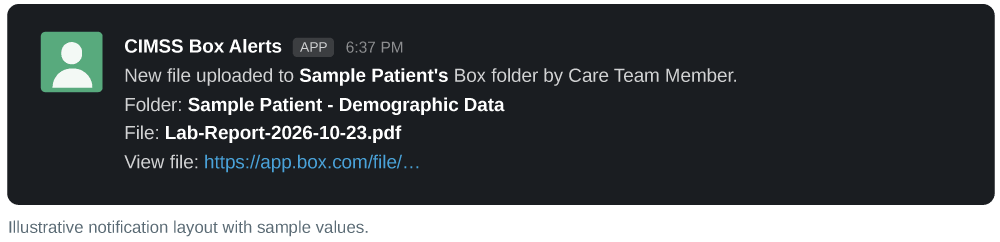
Each notification is plain language and carries only metadata, never file contents:
- Which patient account the folder belongs to
- What happened (for example, a new file was uploaded) and who did it
- The folder name
- The file name
- A direct link to open the file in Box
Events covered
| Event | Notification posted |
|---|---|
| File uploaded | Yes |
| File renamed | Yes |
| File moved to a different folder | Yes |
| File trashed | Yes |
Channel setup
| Channel type | What is required |
|---|---|
| Public channel | Nothing. The app posts automatically. |
| Private channel | A one-time step: add the CIMSS Box Alerts app to the channel manually. After that, alerts flow automatically. |
Access Governance End to End
Box is the gatekeeper for both paths. Neither introduces a parallel permission model.
| Question | Slackbot connected to Box | CIMSS Box Alerts |
|---|---|---|
| Who can receive or see results? | Only users with access to the file in Box | Only members of the patient’s Slack channel |
| What if a user lacks Box access? | The bot cannot find or summarize the file for them | They may see the alert if they are in the channel, but the link opens to a “you don’t have access” message, not the file |
| What data leaves Box? | Only what the asking user could already open | File metadata only (patient, user, folder, file name, link) |
Operational guidance: because alert delivery follows channel membership, patient channels should be managed with the same care as the patient’s Box folder collaborators. Keeping the two membership lists aligned means everyone who is notified can also open the file.
Design Principles
- Box owns access. We never copy permissions into Slack.
- Deterministic where it counts. Alerts use webhooks and rules, so they are fast, predictable, and auditable.
- Metadata, not content. Alerts tell you something happened and point you to the source. They do not reproduce the file.
- Meet people where they work. One Slack channel serves both the question and the alert.
Setup Checklist
- Slack workspace connected to the Box production account
- Care team members added as collaborators on the patient’s Box folder
- Box webhook registered on the patient folder structure, delivering to the Salesforce endpoint
- Each Box folder linked to its patient account (FRUP record present)
- Each patient account linked to its Slack channel in Salesforce
- CIMSS Box Alerts Slack app installed in the workspace
- For private channels: app added to the channel once
Known Boundaries
- An alert can only be routed if the Box folder is associated with a Salesforce account and that account has a Slack channel on record.
- Private channels need the one-time manual app addition before the first alert.
- Alert recipients are determined by Slack channel membership, so membership hygiene matters.
Conclusion
Ask when you need something. Be told when something changes. Both inside the Slack channel the care team already uses, and both under the Box permissions the organization already trusts. That is what headless patient documents look like in IHOS.
No one should have to chase information. It should come to them.
CIMSS Innovative Solutions builds intelligent healthcare operating systems on the Salesforce platform. Visit cimss.com.

Anirudh Garg
Senior Salesforce Developer, CIMSS